Reviews
Linkwarden Review 2027: The Archivist's Open-Source Bookmark Manager
Linkwarden in 2027: AGPL-3.0 and free to self-host, Cloud at $3/month per user billed yearly, 30,000 links, multi-format archiving, and the retrieval gap.
The short answer for 2027: Linkwarden is the archivist’s bookmark manager, and nothing else in the category preserves a library as thoroughly. Every link you save is automatically archived as a screenshot, a PDF and a readable copy, and can be pushed to the Wayback Machine. Self-hosted it is completely free under AGPL-3.0 with every feature included. Cloud is $3/month per user billed yearly — or $4/month billed monthly — with no free tier beyond a 14-day trial and up to 30,000 links per user. What it will not do is organise your library for you or find things by meaning, and in 2027 that gap is the whole decision.
We first reviewed Linkwarden in August 2026. This edition re-verifies every price, plan limit and platform against our dated fact sheet, corrects five things the 2026 edition got wrong — including one row in our own comparison table that misdescribed our own product — and adds the two assessments that edition skipped: what the cloud plan costs a household or a team over three and five years, and what happens to an archive if the project behind it changes hands.
Disclosure: this review is published by Marqly, a hosted, closed-source competitor that cannot be self-hosted and does not archive pages automatically. Linkwarden’s core promise — your links, preserved, on infrastructure you can own — is one we do not compete on, and we assess it here as the most preservation-focused tool in the category. Where Linkwarden wins a row against our own product, the table says so, and it wins most of them. Our criteria are in how we test.
Key facts at a glance:
| Linkwarden | |
|---|---|
| Best for | Self-hosters, researchers and teams who treat bookmarks as an archive |
| Self-hosted price | Free, AGPL-3.0, all features included |
| Cloud price | $3/month per user billed yearly (25% off) · $4/month billed monthly |
| Free Cloud tier | None — a 14-day trial, then you subscribe |
| Cloud allowance | Up to 30,000 links per user, expandable via support |
| Platforms | Web, iOS, Android; extensions for Chrome, Firefox and Edge |
| Standout | Automatic multi-format archiving plus Wayback Machine submission |
| Hardest limits | No semantic search, no summaries, no reader queue, no Safari extension |
| Fact sheet | Last verified August 2, 2026 |
How this review was compiled. Prices, plan limits, feature flags and platform lists come from our dated Linkwarden fact sheet, last verified against linkwarden.app on August 2, 2026, and cross-checked against the sheets we keep for every tool in this category. Marqly publishes this article and is one of the products discussed. Where we measured something rather than asserted it, the data lives in the import-fidelity study. We publish no numeric ratings for any product, including our own, and we invent no benchmark numbers.
What changed since our 2026 review
Five corrections, plus three gaps the old edition left.
- Our comparison table misdescribed Marqly, in Marqly’s disfavour. The 2026 edition’s collaboration row read “No teams (public board sharing only).” That was wrong then and is more wrong now: Marqly Teams exists at $9/seat/month or $72/seat/year, with a three-seat minimum, one bill paid by the Owner, and every seat including all Pro features. Linkwarden still wins the row — its shared collections have per-member editing permissions and Marqly’s Teams has no SSO, no SCIM and no per-board permissions — but “no teams” was simply false, and a review that flatters its own publisher’s competitor by accident is still a review that got a fact wrong.
- The mobile apps are from late 2025, not 2026. We wrote that “in 2026 the team also shipped official iOS and Android apps.” Our fact sheet dates both to late 2025. The correction matters because it changes the maturity read: by 2027 these apps have had a year in the field, and our current sheet still records them as “new and catching up to the web experience.”
- The platform list was vague, and the vagueness hid two facts. We wrote “the existing browser extension,” singular. Extensions ship for Chrome, Firefox and Edge — and there is no Safari extension. If your daily browser is Safari, that is a disqualifier the 2026 edition never named. It also claimed an “installable PWA,” which our fact sheet does not record, so we have dropped it.
- We over-listed the archive formats. The 2026 edition said every link is captured as “full HTML, a screenshot, a PDF, and a readable text view.” The verified set is a screenshot, a PDF and a readable text copy, plus optional Wayback Machine submission. “Full HTML” is a different claim from “readable copy” — it implies raw markup with assets — and we cannot source it, so it is gone.
- Claims we dropped entirely. RSS feed subscriptions, “search operators for precision,” Floccus browser-bookmark sync, and third-party managed hosting from Elestio and Railway all appeared in the 2026 edition and none appear in our fact sheet. What the sheet does verify is full-text search across archived content, a documented REST API with access tokens, and browser extensions for Chrome, Firefox and Edge.
What we under-credited: Linkwarden has highlights and annotation notes, offline caching in the mobile apps, save-as-PDF, and imports from Pocket and browser bookmark HTML. The old edition mentioned highlights in passing and the rest not at all.
What we under-warned about: the fact sheet’s own summary of the reading experience is blunter than ours was. Linkwarden is “built for collecting and preserving, not reading — no reader queue, no text-to-speech, no reading progress.” The 2026 edition called the reader “competent rather than luxurious.” The honest version is that there is no reading workflow to be competent at.
What is Linkwarden?
Linkwarden is an open-source, self-hostable bookmark manager built around a blunt observation: the web rots. Links break, pages get rewritten, publications shut down, and a bookmark to a dead page is a note that says “you used to know something.” Linkwarden’s answer is to archive everything automatically, in several formats, the moment you save it — and optionally to push a copy to the Internet Archive so there is a version nobody can delete.
The project is licensed AGPL-3.0, has grown past 19,000 GitHub stars, and is developed in the open with a steady release rhythm. You can self-host it with Docker, in which case every feature is included at no cost, or pay for the official Cloud at linkwarden.app. The AGPL matters more than it sounds: it is the licence that keeps a self-hosted instance feature-complete rather than feature-crippled, which is the trick a lot of “open core” projects use to push you into a subscription.
The second thing to know is that Linkwarden is genuinely collaborative in a category that mostly is not. Collections can be shared with teammates with per-member permissions, or published as public pages anyone can view without an account. For a research group, a content team, a classroom or a shared reading list, that is the second superpower — and the reason a school or a small organisation might pick Linkwarden over a personal bookmark app.
Development is funded by the Cloud subscription, which is a sustainable model in a category where two of the best-loved free tools died inside eight months.
Key features
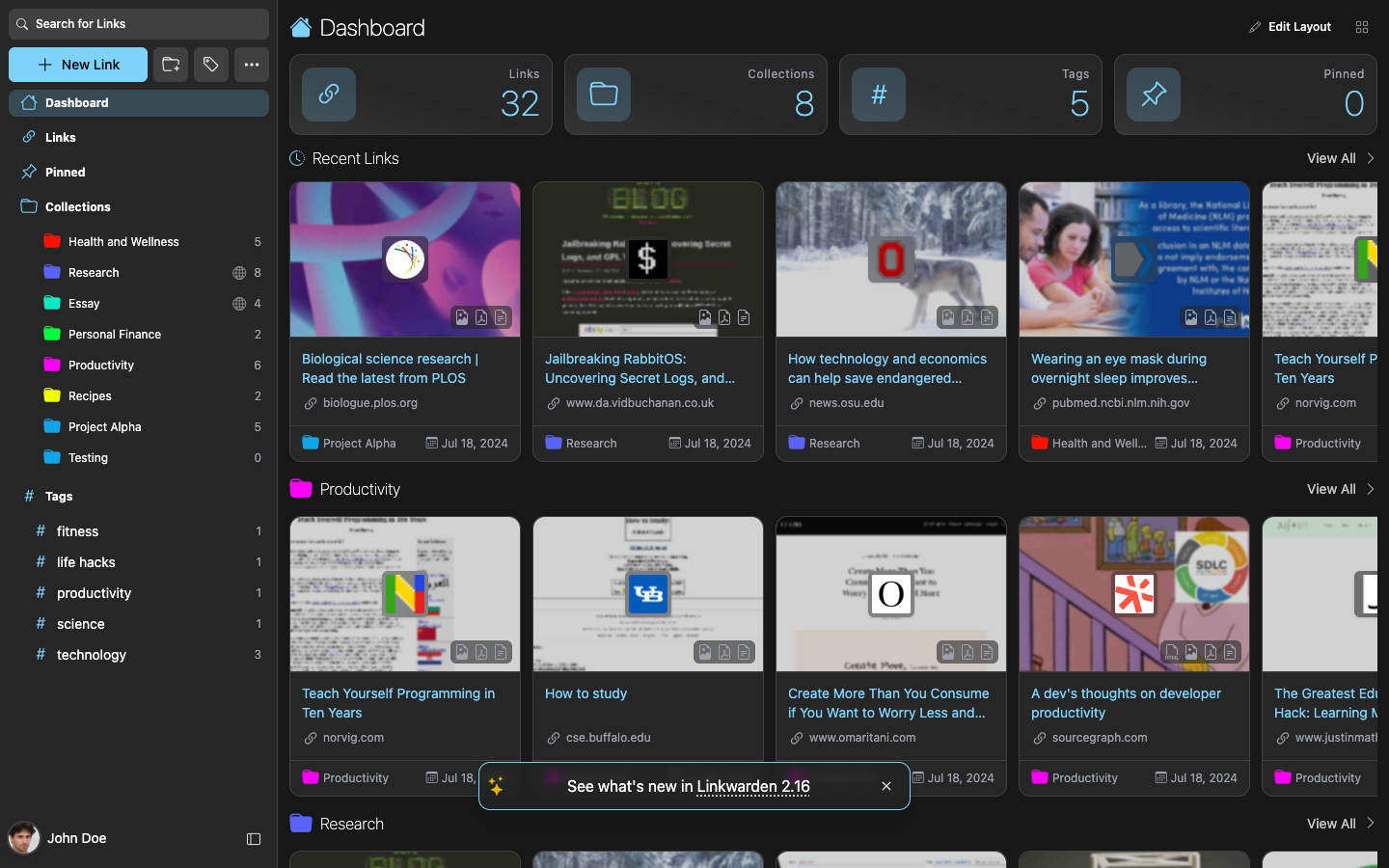
- Multi-format page preservation. The headline feature, and the reason the product exists. Every saved link is captured as a screenshot, a PDF and a readable text copy, and Linkwarden can also submit the page to the Wayback Machine. Archived copies can be downloaded. Years from now, when a share of your links have rotted, your library still opens.
- Collections, tags and real collaboration. Links organise into nested collections with sub-collections, plus tags. Collections can be shared with teammates with per-user permissions or published publicly. This is executed properly rather than bolted on, and it is the feature most rivals treat as an afterthought.
- Optional AI tagging, including local models. Linkwarden can auto-tag new saves using AI, and it supports local models, so self-hosters can keep the automation on their own hardware. Note the scope precisely: it tags. There are no AI summaries, no chat with your library and no semantic retrieval layer. The AI files things; it does not help you get them back out.
- Full-text search across archived content. Search reaches into what was archived, not just titles and tags — which is more than most bookmark managers offer and less than a semantic index. It is keyword retrieval over a bigger haystack.
- Highlights and annotation notes. Present, and useful for marking up what you saved rather than only filing it.
- Documented REST API with access tokens. Integrations, scripting and full programmatic export are all first-class rather than reverse-engineered.
- Official iOS and Android apps. Launched late 2025 with share-sheet saving and offline caching. New, and still behind the web app in depth.
- Browser extensions for Chrome, Firefox and Edge. No Safari.
- Imports from Pocket and browser bookmark HTML. Directly relevant in 2027, when most migrations into any tool are rescues out of a dead one.
What is absent is a coherent set rather than a list of gaps: no semantic search, no AI summaries, no AI Q&A, no YouTube tooling, no reader queue, no text-to-speech, no reading progress, no one-click save-all-tabs, and no free hosted tier.
Pricing, verified October 2026
| Option | Price | What you get |
|---|---|---|
| Self-hosted | Free | AGPL-3.0, every feature included, no caps beyond your own hardware |
| Cloud | $3/month per user billed yearly | Hosted infrastructure, full preservation, AI tagging, full-text search, up to 30,000 links per user, priority support |
| Cloud, monthly | $4/month per user | Identical features; yearly billing is 25% off the monthly price |
| Cloud, free | None | There is no permanent free Cloud tier. A 14-day trial, cancel anytime, is the only free access |
Four things about this ladder that a price table alone does not convey.
The yearly option is the only sane one. $3/month billed yearly against $4/month billed monthly is 25% off the monthly baseline — $36 per user per year instead of $48. Same features, no reason to pay monthly beyond the first month of deciding.
30,000 links per user is effectively unlimited for personal use, and it is expandable via support if you are not. Nobody reading this review will hit it by accident.
“Free” and “Cloud” are different products in the sense that matters. Self-hosted is free forever with everything included. Cloud has no free tier at all — the 14-day trial is an evaluation window, not a plan. If someone tells you Linkwarden has a free tier, ask which one they mean, because the answer changes the recommendation.
Per-user pricing cuts both ways. For a household or a team, per-seat billing is how a $3 tool becomes a $36/year-per-person tool. That is still cheap — cheaper than almost anything else here — but it is not the flat $3 the headline implies. The team arithmetic is below.
What Linkwarden costs over three and five years
Verified prices only, assuming the plan and the price hold:
| Path | Year 1 | 3 years | 5 years |
|---|---|---|---|
| Linkwarden, self-hosted (software) | $0 | $0 | $0 |
| Linkwarden Cloud, $3/mo per user billed yearly — 1 user | $36 | $108 | $180 |
| Linkwarden Cloud, monthly — 1 user | $48 | $144 | $240 |
| Linkwarden Cloud, yearly — 3 users | $108 | $324 | $540 |
| Marqly Teams, 3 seats at $72/seat/year | $216 | $648 | $1,080 |
| Marqly Pro, single, $72/year | $72 | $216 | $360 |
| Karakeep Cloud Pro, $4/month | $48 | $144 | $240 |
| Raindrop.io Pro, $28/year | $28 | $84 | $140 |
| Instapaper Premium, $59.99/year | $59.99 | $179.97 | $299.95 |
Two readings, and they point in opposite directions.
For a team, Linkwarden Cloud is the cheapest collaborative archive in the category by a wide margin. Three seats at $36 each is $108 in year one, against $216 for three Marqly Teams seats. Over five years the gap is $540 against $1,080. If the job is “a shared, permanently preserved link collection for a small team,” nothing here touches that price. Linkwarden also wins on the thing a school or a small business worries about most: per-member permissions and public collection pages, which Marqly Teams does not have.
For a single person, the self-hosted row makes every subscription look silly. $0 forever, all features. The catch is the same one Karakeep has: the licence is free, and the machine, the updates, the backups and the disk space for screenshots and PDFs are not. Multi-format archiving is storage-hungry by design — every save writes three copies plus whatever Wayback submission adds — so a self-hosted Linkwarden wants a proper server rather than the smallest VPS you can find.
One honest note in Marqly’s favour, because the table above is not the whole comparison: a Marqly Teams subscription that lapses does not delete anything. On cancellation the team goes read-only to the end of the paid period, and nothing is removed. For an institution worried about a lapsed licence, that is a stronger answer than the price difference implies.
Durability and portability: the archivist’s own archive
This is the section our 2026 edition did not write, and it is a strange one to write about Linkwarden, because the product is literally a durability tool. So the question is whether the tool itself is durable.
The category’s recent record makes the question fair rather than paranoid. Omnivore shut down in November 2024 after its team was acqui-hired by ElevenLabs; users had until November 30, 2024 to export before deletion. Mozilla shut Pocket down on July 8, 2025; export access and the API were disabled on November 12, 2025, data deletion began then, and Premium subscribers received prorated refunds. Both are marked shutdown in our data layer. Two well-loved, widely recommended tools, gone inside eight months — one of them backed by a foundation rather than a venture round.
Against that record Linkwarden scores well on every axis we can verify.
Licence. AGPL-3.0, with all features included when self-hosted. That is the strongest licence posture in the category: no open-core cripple, no paid gate on the self-hosted build. If Linkwarden the company disappeared tomorrow, a self-hosted install keeps running and the code can be forked — which is precisely what happened to Omnivore’s codebase.
Revenue model. Funded by the Cloud subscription. That is a real business rather than a free service with no revenue, and the free-service-with-no-revenue model is the one that killed Omnivore. It also means the Cloud product has a reason to keep existing.
Export path. This is where Linkwarden is close to unimpeachable. Settings export your links as standard bookmark HTML or JSON — formats every other manager can read — archived page copies including screenshots and PDFs can be downloaded, and a documented REST API allows full programmatic export. Self-hosters already have the database and the file storage. There is no version of leaving Linkwarden where your archive is trapped.
Import path. Pocket and browser bookmark HTML are both supported, which makes Linkwarden a viable landing spot for a rescued library rather than only a fresh start. Our import-fidelity study is worth reading before any migration: measured on September 26, 2026, it found 0 of 261 items parsed from a Pocket export’s HTML preview file and 43 of 43 from a Chrome bookmark export. The file you feed an importer matters more than the importer’s reputation.
The one durability risk that is specific to Linkwarden. Its whole value proposition is copies — screenshots, PDFs, readable text, Wayback submissions. That means your archive’s size grows with every save, and it grows in binary blobs rather than in text. A self-hosted Linkwarden that has not had its storage watched for two years is a self-hosted Linkwarden that eventually stops archiving. The failure mode here is not the vendor disappearing; it is your disk filling up quietly. Budget for it, and test a restore once.
Strengths
- Preservation nobody else matches. A screenshot, a PDF and a readable copy for every link, automatically, plus Wayback Machine submission. If link rot has ever cost you a citation, this is the cure.
- Open source done properly. Clean AGPL-3.0 licensing with genuine self-host parity — no feature held back for the paid cloud. No lock-in anywhere.
- Real collaboration. Shared collections with per-member permissions and public collection pages. Rare in this category, well executed, and the cheapest way to get it.
- Aggressive, honest pricing. $36/year per user on Cloud, or $0 self-hosted. The money argument is very hard to lose.
- A 30,000-link allowance that is effectively unlimited, and expandable via support if it is not.
- Full-text search into archived content, not just titles and tags — a bigger haystack than most rivals give you.
- Local-model AI tagging for self-hosters who want automation without a cloud in the loop.
- Export in standard formats plus a documented API. The best portability story among the hosted-capable tools we cover.
- A maturing client story. Official iOS and Android apps with offline caching, three browser extensions, a REST API.
Weaknesses
- Retrieval is entirely on you. Search is keyword and full-text. If you cannot recall words that appear in the page, no number of archived formats will surface it. There is no semantic search — the gap we keep measuring across this category in the AI bookmark manager guide.
- The AI stops at tagging. No summaries for triaging a backlog, no Q&A over your library, nothing that resurfaces an old save. Compared with Karakeep — its closest open-source rival — Linkwarden’s intelligence layer is a clear step behind.
- It is not a reading app. No reader queue, no text-to-speech, no reading progress. You can read an archived copy and highlight it; there is no workflow built around getting through a pile. Heavy readers need something alongside it.
- No free hosted tier. The 14-day trial is an evaluation window. Free means running your own server, full stop.
- Self-hosting has real appetite. A headless browser doing captures, three copies per save, and storage that grows fast. It wants a proper server, not the smallest VPS.
- No Safari extension. Chrome, Firefox and Edge only. Apple-only households are served on mobile and the web app, not in the browser.
- The mobile apps are still catching up. Launched late 2025, and our current sheet still records them as behind the web experience.
- No native desktop apps. Browser-first, and desktop-app fans should know it.
- No YouTube tooling and no one-click save-all-tabs. Increasingly standard elsewhere at similar prices.
How Linkwarden compares to Marqly
We make Marqly, so read this with that in mind — and note that Linkwarden wins the ownership and preservation rows outright, and there is no honest way to present this table where it does not.
| Linkwarden | Marqly | |
|---|---|---|
| Core idea | Preserve everything you save, forever | Find anything again by describing it |
| Preservation | Screenshot + PDF + readable copy + Wayback, automatic | Save as PDF on demand, matching the on-screen layout |
| Open source / self-host | Yes, AGPL-3.0, all features | No |
| Search | Keyword and full-text over archived content | Pro — semantic across titles, content, highlights, YouTube transcripts |
| Auto-tagging | Optional AI tagging, local models supported | Automatic on every save, zero config |
| AI summaries | No | Yes, on Pro |
| AI Q&A over your saves | No | Yes — Ask, Pro, with numbered citations |
| YouTube | Saves the link | Summary, transcript and chat on the watch page |
| Team collaboration | Shared collections with per-member permissions | Teams — $9/seat/mo or $72/seat/yr, 3-seat minimum, no SSO/SCIM, no per-board permissions |
| Public sharing | Public collection pages | Public boards, view-only, no signup to view — free on every plan |
| Price | Free self-hosted; $36/yr per user on Cloud | Free tier up to 100 bookmarks; Pro $72/yr (≈$6/mo) or $9/mo |
| Free hosted tier | ❌ 14-day trial only | ✅ up to 100 bookmarks, keyword search, no card |
| API | Yes, documented REST | No public API |
| Highlights and notes | Yes | 6 colours, free on every plan; notes unlimited on Pro |
| Offline reading | Yes, mobile caching | Pro, web app and iOS app only, saved per device |
| Bulk import | Pocket, browser bookmark HTML | Browser HTML, Raindrop HTML, the list.csv inside a Pocket export archive, generic CSV |
| Export | HTML or JSON, plus downloadable archives and API | CSV button; complete account copy via support |
| Platforms | Web, iOS, Android; Chrome, Firefox, Edge | Web, Chrome, Edge, Firefox, Safari, iOS, Android |
| Setup | Docker, or a Cloud signup | Sign up and save |
The fair summary is that Linkwarden and Marqly optimise opposite ends of a bookmark’s life.
Linkwarden is unbeatable at keeping what you save. Multiple formats, automatically, on your server, under your rules, in a licence that guarantees the self-hosted build is the whole product. It wins every ownership row, every preservation row, and the team-price row by a factor of two.
Marqly is built for getting things back out. Semantic search means you can describe a half-remembered page and get it. Ask answers from your own library with numbered citations that open the source. Automatic tagging with no key to configure and no model to choose. YouTube videos arrive with summaries and transcripts attached. Offline reading is a Pro feature of the web and iOS apps, and it is per-device — there is no server copy, so each device holds its own downloads. Marqly’s free plan stores up to 100 bookmarks with keyword search across the whole library and needs no card; every AI feature is Pro at $72/year or $9/month, with a standing $49 first-year offer, which is 31% off the $72 list price, and $48 in the first year for verified students.
A pile of perfectly preserved pages you cannot find is half a solution. Perfect recall over links that have rotted is the other half. Know which failure mode you actually fear, then pick — and if you fear both, some people run Linkwarden as the vault and something retrieval-first as the index. That is not a confused setup; it is an honest one.
The row-by-row version lives in Marqly vs Linkwarden.
Linkwarden against the rest of the 2027 field
Because the real decision is rarely Linkwarden versus one named rival:
| Linkwarden | Karakeep | Wallabag | Raindrop.io | Marqly | |
|---|---|---|---|---|---|
| Self-host for free | ✅ AGPL-3.0 | ✅ open source | ✅ MIT | ❌ | ❌ |
| Hosted price | $36/yr per user | $48/yr (beta) | €11/yr | $28/yr | $72/yr |
| Permanent free hosted tier | ❌ | ⚠️ 10 bookmarks | ❌ | ✅ unlimited | ⚠️ 100 bookmarks |
| Automatic page archiving | ✅ 3 formats + Wayback | ✅ 3 formats | ✅ | ⚠️ Pro only | ⚠️ on demand |
| AI auto-tagging | ⚠️ optional, local models | ✅ BYO key or Ollama | ⚠️ rule-based, no AI | ❌ save-time suggestions on Pro | ✅ Pro |
| Semantic search | ❌ | ✅ | ❌ | ❌ | ✅ Pro |
| AI summaries | ❌ | ✅ | ❌ | ❌ | ✅ Pro |
| Team permissions | ✅ best in class | ❌ | ❌ | ⚠️ shared collections | ⚠️ Teams, 3-seat min |
| ePub export for e-readers | ❌ | ❌ | ✅ the sleeper feature | ❌ | ❌ |
| Text-to-speech | ❌ | — | ❌ lacks audio | — | ❌ |
| API | ✅ | ✅ REST + webhooks + CLI + MCP | ✅ | ✅ | ❌ |
| Safari extension | ❌ | ✅ | ❌ | ✅ | ✅ |
| Edge extension | ✅ | ❌ | ❌ | ✅ | ✅ |
| Fact sheet verified | Aug 2, 2026 | Aug 2, 2026 | Aug 2, 2026 | Sep 12, 2026 | Sep 26, 2026 |
Read across and Linkwarden’s position is precise. It is the only tool here that pairs automatic multi-format archiving with real team permissions, and it is the cheapest way to get either. It loses the AI column to Karakeep, which will run summaries and semantic search on your own hardware. It loses the price column to Wallabag at €11/year on official hosting, and loses the free-tier column to Raindrop.io, whose free plan is unlimited rather than absent. And it loses retrieval to Marqly, which is the only one in the set with semantic search and AI Q&A.
Wallabag deserves a specific mention for e-reader owners: it exports to ePub, which is why a lot of Kobo and Kindle-adjacent readers never leave it. Linkwarden has no equivalent, because Linkwarden is an archive rather than a reading queue.
One convention note on that grid: a — means our fact sheet records the capability neither way, not that we confirmed its absence. We would rather leave a cell empty than fill it from memory.
Who should skip Linkwarden
Real disqualifiers, in the order people hit them:
- Your problem is retrieval, not rot. If your library’s failure mode is “I saved it and never found it again,” archiving it in three formats does not fix that. This is the single most common reason people leave, and it is not a bug Linkwarden intends to fix — preservation is the product.
- You want a free hosted account. There is no permanent free Cloud tier. The 14-day trial expires and then it is $3/month per user billed yearly, or self-host.
- You live in Safari. No Safari extension. Chrome, Firefox and Edge only.
- You want to read in it. No reader queue, no text-to-speech, no reading progress. Pair it with a read-it-later app rather than expecting it to be one — our read-it-later roundup for 2027 ranks those.
- You want AI to summarise a backlog or answer questions. Tagging is the whole AI surface.
- You have no always-on machine and no intention of getting one, and $36/year per user feels like too much. That combination leaves you nowhere, and you should look at Raindrop.io’s free tier instead.
- You need SSO, SCIM or directory-based provisioning for a school or a company. Linkwarden has per-collection permissions, not identity management. Neither does Marqly Teams, for what it is worth — if SSO is a hard requirement, this whole category is the wrong shelf.
- Your disk is small and your saving is heavy. Three copies per save plus optional video pulls fills storage faster than a plain bookmark list, and an archive that stops archiving is worse than no archive.
And who should not skip it: researchers, journalists, lawyers and citation-heavy writers who need pages as they were; teams and classrooms sharing curated collections with permissions; self-hosters who want a polished, actively developed, properly licensed tool; and anyone burned by a shutdown who has decided that the only library they trust is one they hold. Inside that profile Linkwarden is the best preservation tool available, at the lowest price in the category.
Verdict
Linkwarden in 2027 is still the best preservation-first bookmark manager in the open-source world, and the case for it has strengthened rather than weakened since we last reviewed it. The mobile apps have had a year in the field. The licence remains AGPL-3.0 with genuine self-host parity, which in a category that lost Omnivore and Pocket inside eight months is not a detail — it is the reason a self-hosted Linkwarden is a permanent library rather than a rented one. Cloud at $36/year per user is the cheapest collaborative archive we know of, and the export path is standard bookmark HTML or JSON with downloadable archives and a documented API on top.
Its limitation is unchanged and structural: the intelligence layer is thin. Keyword and full-text retrieval, tagging as the only AI, no summaries, no Q&A, no reading workflow. Linkwarden keeps things magnificently and finds things literally. If permanence is what you need, keep it as your vault and stop reading reviews. If what you need is to find what you saved — to describe a half-remembered page and get it back — that is the other half of the problem, and it is the half Marqly was built around. The free plan needs no card, stores up to 100 bookmarks with keyword search across the whole library, and imports browser bookmark HTML, Raindrop collections or the list.csv from inside a Pocket export archive.
For deeper analysis: Marqly vs Linkwarden, the head-to-head Linkwarden vs Karakeep if you are choosing between the two open-source leaders, the full list of Linkwarden alternatives, our self-hosted Pocket alternative guide, the Pocket migration guide if you are rescuing an old archive, and the free tools directory for inspecting an export before you commit it anywhere.
Prices, plan limits and platform lists verified against our dated Linkwarden fact sheet, last checked against the official site on August 2, 2026, and re-read for this edition in October 2026. Changes from the 2026 edition: Marqly’s collaboration row corrected from “no teams” to Teams at $9/seat/month or $72/seat/year with a three-seat minimum; the iOS and Android apps re-dated from 2026 to late 2025; the browser extension list specified as Chrome, Firefox and Edge with no Safari, and an unsourced PWA claim dropped; the archive format list corrected to screenshot, PDF, readable copy and Wayback, removing an unsourced “full HTML”; unsourced RSS, search-operator, Floccus and third-party-hosting claims removed; the 30,000-link allowance marked expandable via support and the absence of a free Cloud tier stated explicitly; and highlights, offline caching, save-as-PDF and Pocket/browser-HTML imports added. We publish no numeric ratings. We will update this review as plans change.
Frequently asked questions
- Is Linkwarden worth it in 2027?
- Yes, if preservation or collaboration is the problem you actually have. Every saved link is archived as a screenshot, a PDF and a readable copy, and can be pushed to the Wayback Machine, so the library survives link rot; shared collections with per-user permissions are the rarest feature in this category; and it costs nothing self-hosted or $3/month per user billed yearly on Cloud. If your problem is finding saves again, its keyword search and tag-only AI will feel thin.
- Is Linkwarden free?
- Self-hosted, yes — completely. Linkwarden is open source under **AGPL-3.0** and a self-hosted instance includes every feature at no cost beyond your server. The managed Cloud service has **no permanent free tier**: it is $3/month per user billed yearly, or $4/month billed monthly, after a 14-day trial, with up to 30,000 links per user.
- How much does Linkwarden Cloud cost?
- **$3/month per user billed yearly** — the yearly option is 25% off the $4/month monthly price, so $36 per user per year — or **$4/month billed monthly**. The allowance is up to 30,000 links per user, expandable via support. There is no free Cloud tier beyond the 14-day trial.
- Does Linkwarden archive full pages?
- Yes, and it is the signature feature. Every saved link is automatically preserved as a **screenshot, a PDF and a readable text copy**, and Linkwarden can additionally submit the page to the Internet Archive's **Wayback Machine**. Archived copies can be downloaded. Even if the original site dies, your copies remain.
- Does Linkwarden work on iPhone and Android?
- Yes. Official iOS and Android apps launched in **late 2025** with collections, tags, search, share-sheet saving and cached data for offline viewing, and they work with both Linkwarden Cloud and self-hosted instances. They are still catching up to the web experience, which remains the most complete way to manage a large library. Browser extensions cover Chrome, Firefox and Edge — there is no Safari extension.
- Can I export my data from Linkwarden?
- Yes, thoroughly. Settings export your links as **standard bookmark HTML or JSON**, archived page copies such as screenshots and PDFs can be downloaded, and a documented REST API allows full programmatic export. If you self-host, everything already lives in your own database and file storage, so portability is total by design.
- What are the best Linkwarden alternatives?
- [Karakeep](/blog/karakeep-review-2027) is the closest open-source rival — AI-heavier, with summaries and semantic search on your own key or a local Ollama model, but no team permissions. [Wallabag](/alternatives/wallabag) is the reading-focused self-hosted counterpart. [Raindrop.io](/blog/raindrop-review-2027) is the polished hosted option with the best free tier, and Marqly is the hosted pick if finding saves matters more than archiving them.






